

This post contains affiliate links. For more information, please see my disclosures here.
The Wavy Blade is a great tool to use with the Cricut Maker series to make paper projects just a little fancier! This Easter card uses the Wavy Blade for two of the layers. If you have a different machine, you can change those layers to basic cut.

This card is based on sketch 578 from Freshly Made Sketches.
Supplies I Used:
- Cardstock
- Pearl Paper
- Cricut Pen
- Double-Sided E-Z Runner Grand Adhesive Dispenser
- Art Glitter Glue Designer Dries Clear Adhesive
- 30ml Precision Tip Applicator Bottle
- A7 Envelopes
- QuickSwap™ Housing
- Wavy Blade Tip
- Scoring Wheel Tip
- Cricut Maker
- Color Petal Ink Pads (optional)
- Mini Ink Blending Set (optional)
Cutting the Project
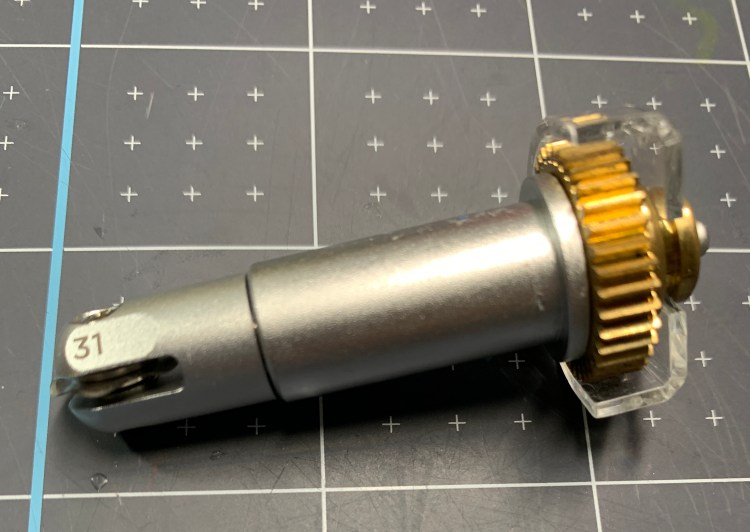
If you have previously purchased the QuickSwap Housing for the Scoring Wheel, Engraving Tip, or Fine Debossing Tool, you don’t have to purchase a new housing. You can use the same housing with Wavy Blade.
Make sure your machine selection is set to Maker or Maker 3. Otherwise, you will get this error.


After clicking Make It, you’ll be on the Prepare screen. This is where I stop and gather my materials and tools, and position my materials on the mat. The left column says what operations will be used on each mat. The first mat needs the Scoring Wheel, a pen, the Wavy Blade, and the Premium Fine Point Blade for the basic cut.
Note that some material settings will be unavailable when the Wavy Blade is selected. This is normal. The Wavy Blade can’t be used on any setting that is a double cut.


After selecting the material, Design Space will prompt you to load the needed tools. First, you’ll load the pen in clamp A and the Scoring Wheel in Clamp B. Load the mat and press the cut button when it lights up.
After completing the writing and the scoring, the machine will pause, and Design Space will prompt you to load the Wavy Blade. After cutting the Wavy Blade portion, the machine will pause again, and Design Space will prompt you to load the Fine Point Blade.
This card is made of simple layers that assemble quickly and easily from the bottom to the top. An easy way to visualize the order for assembly is to ungroup everything and spread the layers out on the canvas.

Design Space Project Link
This project will cut for free with a Cricut Access subscription. Here is the Design Space Project link.


The above post contains affiliate links. For more information, please see my disclosures here.
